Cookie policy
Sentrynet does not collect data, and accepting the settings is necessary to use the contact form.
The full privacy policy is available on the privacy page.
Frequently Asked Questions
HIDDEN TRACE BY SENTRYNET
Whether you have a few smart devices or a large-scale deployment, we help ensure your IoT environment remains secure.
Once the analysis is complete, one of our analysts reviews and signs the report before delivering it to the customer.
The report will highlight any active threats or unusual behavior that may require further investigation.
With over 20 years of expertise in detecting data exfiltration and cyber threats, HT delivers powerful analysis to uncover if your device has been compromised.
If a threat is active, our systems can detect it quickly. Dormant threats (inactive and waiting to trigger) will only be detected once they start operating — which is why we offer flexible monitoring options to match your needs:- 2 hours: Perfect for a quick check-up against common spyware or malware from the dark web when there’s no clear sign of compromise.
- 24 hours: Ideal for checking your device even during periods of non-use or suspected targeted attacks, accidental clicks on suspicious links, confirmed compromises, or ransomware incidents.
- 30 days: The optimal solution to improve the analytical capabilities of the AI.
- Unlimited: Keep calm and stay safe. Continuous Monitoring and proactive protection that spots threats as they emerge, records evidence for investigations, and can even trigger an automatic response to stop cybercriminals in their tracks
- IoT Devices - Quick and straightforward. HT instantly flags suspicious activity without needing extra data.
- Smartphones & Tablets - Advanced behavioral analysis spots unusual patterns and signs of compromise with high precision.
- PCs & Laptops - The most challenging category, as user-installed services and custom configurations can cause false positives. In these cases, HT reports are best reviewed by the IT specialist who supports the device’s configuration.
HT is designed to monitor any device operating within your network or connected to the internet.
We will either provide you with a pre-configured probe or guide you through the setup process. Once installed, the probe will securely communicate with our systems to begin the analysis.
THREATS
An APT (Advanced Persistent Threat) is a highly sophisticated, long-term cyberattack typically carried out by well-funded and skilled threat actors, such as nation-states or organized criminal groups.
The main characteristics of an APT are:
🔍 Key Features of APTs:
- Advanced: Uses complex tools and techniques to bypass security defenses.
- Persistent: Maintains access to the target network over an extended period.
- Threat: Targets specific entities (e.g. governments, corporations, critical infrastructure) to steal sensitive data, spy, or sabotage.
🧠 How APTs Work (Simplified Steps):
- Initial Access - through phishing, zero-day exploits, or social engineering.
- Establish Foothold - install malware or create backdoors.
- Escalate Privileges - gain higher-level access to systems.
- Lateral Movement - spread within the network.
- Data Exfiltration - steal confidential data.
- Maintain Presence - stay undetected for months or even years.
🎯 Common Targets:
- Government agencies
- Defense contractors
- Financial institutions
- Critical infrastructure
- Research organizations
🔐 How Sentrynet Helps:
Our HT platform is designed to detect suspicious activity, including lateral movement techniques. By analyzing metadata, device behavior, and access patterns, we can identify when an attacker is trying to move through your network - before real damage is done.
We help you spot threats early, contain them quickly, and protect your most critical assets.
- Zero-day exploit: When an attacker uses a zero-day vulnerability to launch an attack.
- The term "zero-day" comes from the fact that the developer has had zero days to fix it before it is exploited.
🔥 Example:
A hacker discovers a bug in a popular operating system that no one else knows about. They create malware to exploit it before the company even knows it's vulnerable.
"N" stands for the number of days since the vulnerability was disclosed.
- Attackers target systems that haven't been updated yet.
- These are still dangerous because many systems remain unpatched for weeks or even months.
⚠️ Example:
A security researcher reports a bug on day 0, and a patch is released on day 5. On day 30 (n = 30), attackers exploit systems that haven’t applied the patch — this is an n-day attack.
✅ Key Differences
A ransomware attack is a type of cyberattack where malicious software (ransomware) encrypts the victim’s files or systems, rendering them inaccessible until a ransom is paid, usually in cryptocurrency like Bitcoin.
🧠 How Ransomware Works - Step by Step
- Initial Access
The attacker infiltrates the system via:- Phishing emails with infected attachments or links
- Exploiting vulnerabilities in software or public-facing systems
- Remote Desktop Protocol (RDP) brute-force attacks
- Execution
The ransomware installs and executes silently - File Encryption
A message appears demanding payment in exchange for the decryption key, often with a timer and threat of data destruction or public release. - Optional: Data Exfiltration (Double Extortion)
Modern ransomware also steals sensitive data before encrypting it, threatening to leak it if the ransom is not paid.
🧱 Common Tactics Used in Ransomware
📌 Ransomware Families (Examples)
💰 Should You Pay the Ransom?
No, not recommended (by law enforcement agencies):
- No guarantee you'll get your data back
- Encourages and funds criminal activity
- May violate regulations in some regions
🛡️ How to Protect Against Ransomware
Prevention:
- Train users to recognize phishing
- Patch systems regularly
- Limit access via least privilege principle
- Disable macros and unneeded services
- Use EDR/AV tools to monitor for unusual behavior
- Watch for mass file changes or encryption patterns
- Maintain secure, offline backups
- Create a ransomware response plan
- Segment the network to limit lateral spread
🔄 Real-World Analogy
Imagine someone breaks into your house, locks all your drawers with new locks, then leaves a note asking for money to give you the keys. That’s ransomware.
🔐 How Sentrynet Helps
Our HT platform is designed to detect suspicious activity, including lateral movement techniques. By analyzing metadata, device behavior, and access patterns, we can identify when an attacker is trying to move through your network—before real damage is done.
We help you spot threats early, contain them quickly, and protect your most critical assets.
If you've already been hit by ransomware, we can help identify devices that may still be under cybercriminal control.
- Viruses - Programs that attach to files and spread when infected files are shared.
- Worms - Self-replicating malware that spreads across networks without human action.
- Trojans - Malicious software disguised as legitimate programs.
- Ransomware - Encrypts data and demands payment for its release.
- Spyware - Secretly collects information from a device without the user’s consent.
- RATs (Remote Access Trojans) - Gives attackers complete control over an infected system.
- Adware - Displays unwanted ads, sometimes collecting data to target them.
- Rootkits - Hide malware and attacker activity deep inside the operating system.
Comparison: Commercial Spy Software vs RAT vs Spyware
In short:
- Commercial spy software can be legal but is easily abused.
- RATs are purely malicious and dangerous, often sold in underground markets.
- Spyware works silently, focusing on stealing information over time.
TTPs stand for Tactics, Techniques, and Procedures — a core concept in cybersecurity used to describe how attackers operate. It helps security teams understand, detect, and defend against cyber threats by profiling attacker behavior.
🔍 Breakdown of TTPs
- Tactics (What the attacker wants to achieve)
OSINT can help by checking whether an IP is:- The high-level goals or objectives during an attack.
- Example: Initial Access, Persistence, Privilege Escalation.
- Techniques (How the attacker achieves a tactic)
- The specific methods used to carry out a tactic.
- Example for Initial Access:
- Phishing
- Exploiting public-facing applications
- Procedures (Detailed implementation of a technique)
- The exact steps or tools used by a specific group or campaign.
- Example:
- Using a weaponized Word document sent via email with a macro to install malware.
📊 Example: Mapping a TTP Chain
HKCU\Software\Microsoft\Windows\CurrentVersion\Run🧰 How TTPs Are Used
- Threat Intelligence: Understand how specific threat actors (like APT29 or FIN7) operate.
- Detection Engineering: Write detection rules based on attacker behavior.
- MITRE ATT&CK Framework: A globally used model that categorizes TTPs.
📚 Real Example: MITRE ATT&CK Mapping
- Tactic: Credential Access
- Technique: Credential Dumping (ID: T1003)
- Procedure: Use of Mimikatz to extract passwords from memory
✅ Why TTPs Matter
- Go beyond simple signatures or indicators
- Help build behavior-based detection
- Make it easier to predict and stop similar attacks in the future
Lateral movement is the technique used by cyber attackers to move deeper into a network after they have gained initial access. Instead of immediately stealing data or launching ransomware, they explore, escalate privileges, and spread across systems - all while staying hidden.
🧠 Why Do Attackers Use Lateral Movement?
- To access more valuable systems (e.g., domain controllers, databases)
- To harvest more credentials (through keylogging, token theft, etc.)
- To blend in with legitimate traffic and avoid detection
- To install malware or backdoors on other systems
- To prepare for data theft, ransomware, or sabotage
🚶♂️ Common Lateral Movement Techniques
🔍 Example Scenario: Lateral Movement Attack
- Initial Access
Attacker phishes an employee and gains access to their PC. - Credential Harvesting
Extracts credentials stored in memory using tools like Mimikatz. - Internal Scanning
Maps the internal network to identify other machines and services. - Moving Laterally
Uses RDP or stolen tokens to access a file server, then the domain controller. - Goal Reached
Gains full domain admin rights and exfiltrates sensitive data.
🛡️ How to Detect and Defend Against Lateral Movement
📚 Real-World Analogy
Imagine a burglar who breaks into a small office room (initial access), then quietly sneaks through hallways, unlocking doors with stolen keycards, until they reach the vault (the crown jewel server).
Once a cybercriminal gains access to a device or account inside your network—often through phishing, malware, or exploiting a vulnerability—their job is far from over. In fact, that’s often just the beginning.
To reach high-value systems or sensitive data, attackers use a strategy called lateral movement. It allows them to quietly move across systems and expand their control, often without being noticed.
🔐 How Sentrynet Helps
Our HT platform is designed to detect suspicious activity, including lateral movement techniques. By analyzing metadata, device behavior, and access patterns, we can identify when an attacker is trying to move through your network - before real damage is done.
We help you spot threats early, contain them quickly, and protect your most critical assets.
When spyware infects a device, it usually installs a small background program called an agent.
- Runs silently in the background without the user’s knowledge.
- Collects information such as keystrokes, browsing history, passwords, documents, microphone recordings, or screenshots.
- Prepares this data for transmission to the attacker.
- The agent maintains a covert communication channel (often encrypted) with a Command & Control (C2) server operated by the attacker or organization using the spyware.
- It sends the collected data in regular intervals or in real-time to this remote server.
- The C2 server can also send commands back to the agent — for example, to start recording audio, capture new screenshots, or download additional malware.
- This two-way link allows continuous surveillance and control until the spyware is detected and removed.
- The connection often uses standard internet protocols (HTTP, HTTPS, DNS) to blend in with normal traffic.
- Encrypted communication makes detection harder.
- Even after partial removal, a hidden agent can reconnect and re-infect the system.
PROACTIVE BEHAVIOR
Cybercriminals can remotely exploit IoT devices and PCs to gain unauthorized access, control them, or use them in larger attacks. These devices are often targeted because they are poorly secured, rarely updated, and always connected.
💻📡 How PCs or IoT Devices Are Remotely Exploited
- Default Credentials
- Many IoT devices (routers, cameras, sensors) ship with default usernames/passwords like admin/admin.
- Criminals use automated tools to scan the internet for devices with these defaults still enabled.
- Unpatched Vulnerabilities
- IoT devices often run outdated firmware or software.
- Hackers exploit known vulnerabilities (e.g., CVEs) to run commands remotely.
- Open Ports & Services
- Devices with open ports (e.g., 22, 23, 80, 443) exposed to the internet are vulnerable.
- Attackers use Shodan or Censys to find devices running open services like Telnet, SSH, or HTTP.
- Malware or Remote Access Trojans (RATs)
- Criminals infect PCs or IoT devices with malware that opens a backdoor.
- These Remote Access Trojans allow full control: files, webcam, microphone, even keylogging.
- Botnet Enrollment (e.g., Mirai)
- Once compromised, devices can be recruited into a botnet.
- Used for DDoS attacks, spamming, or brute-forcing other systems.
🎯 Why Criminals Target IoT and PCs
🛡️ How to Protect PCs and IoT Devices
✔️ For PCs:
- Use antivirus and keep OS updated
- Avoid suspicious links and attachments
- Use strong, unique passwords and 2FA
- Change default credentials immediately
- Regularly update firmware
- Disable unused features (e.g., remote access)
- Use a separate network for IoT devices
- Block unnecessary ports and use a firewall
🧠 Final Note:
IoT and PCs are part of a larger attack surface. Once one weak device is compromised, it can become the gateway to the entire network. Good security hygiene and segmentation are key.
Maintaining detailed logs of network connections is essential for detecting, analyzing, and responding to cyberattacks. Connection logs record information such as IP addresses, timestamps, protocols used, and the sequence of events during a session.
Here’s why they matter:- Incident Investigation - Logs provide a timeline of what happened, helping security teams identify the origin, method, and scope of the attack.
- Threat Containment - By reviewing active and recent connections, you can quickly block malicious IPs and stop ongoing intrusions.
- Evidence for Legal or Compliance Needs - Logs serve as documented proof of activity, useful in legal proceedings or to meet regulatory requirements (e.g., GDPR, ISO 27001, NIST).
- Root Cause Analysis - Reviewing logs helps understand vulnerabilities exploited by attackers, so security measures can be strengthened.
- Future Prevention - Patterns found in past attacks can be used to detect and block similar threats before they cause harm.
OSINT (Open Source Intelligence) can be extremely valuable for detecting anomalies in IP addresses, device fingerprints, and domains by leveraging publicly available data sources.
Here's how it helps in each case:
🧠 What is OSINT?
Open Source Intelligence (OSINT) is the practice of collecting and analyzing data from publicly accessible sources (e.g., websites, social media, threat feeds) to gain actionable cybersecurity insights.
🔍 How OSINT Helps Detect Anomalies
- 🖥️ IP Address Anomalies
OSINT can help by checking whether an IP is:- Blacklisted
- Associated with past attacks
- Geographically mismatched
- Linked to TOR or proxy services
- A user logs in from an IP address linked to a known malware C2 server.
- Multiple failed logins from different IPs in a short time window (brute force attempt).
- 🔎 Fingerprint Anomalies
Device fingerprinting collects attributes like OS version, browser type, screen resolution, fonts, etc. OSINT helps by:- Identifying rare or unique fingerprints (used by bots or emulators)
- Cross-referencing fingerprints with known threat actor behaviors
- Detecting sudden changes in a user’s fingerprint (might suggest session hijacking)
- Community feeds (e.g., fingerprint databases)
- Browser and device info aggregators
- Behavioral analysis platforms
- Same account accessed using two very different fingerprints from same location.
- Fingerprint matches known fraud patterns.
- 🌐 Domain Anomalies
OSINT helps analyze domains by checking:- Reputation scores
- WHOIS data
- Passive DNS records
- Typosquatting or lookalike domains
- A domain was created 2 days ago and is already sending emails.
- A domain name closely resembles a trusted brand
✅ Summary Table
🔐 How Sentrynet Helps
Our HT platform fully leverages OSINT techniques to uncover even the most sophisticated threats.
IOCs (Indicators of Compromise) are forensic clues that suggest a system has been breached or is under attack. They are critical in threat detection, incident response, and cybersecurity investigations.
✅ Types of IOCs (With Examples)
- Network Indicators
These relate to suspicious network activity.- Malicius IP addresses
e.g., 185.234.219.243 (known malware C2 server) - Suspicious domains or URLs e.g., login-ver1fy-google[.]com
- Unusual ports or protocols e.g., SSH traffic on port 8080
- Malicius IP addresses
- Host-Based Indicators
Found directly on infected devices or systems.- File hashes (MD5, SHA-1, SHA-256)
e.g., 44d88612fea8a8f36de82e1278abb02f (known malware file) - Unusual file names or paths
e.g., C:\Windows\Temp\backdoor.exe
- File hashes (MD5, SHA-1, SHA-256)
- Email Indicators
Often used in phishing or spear-phishing campaigns.- Suspicious sender addresses
e.g., admin@micros0ft-support.com - Malicious attachments
e.g., .docm files with embedded macros - Phishing links
e.g., shortened URLs or lookalike domains
- Suspicious sender addresses
- Behavioral Indicators
Patterns of behavior that indicate compromise.- Repeated failed logins (brute-force attempts)
- Unusual login times or locations
- Lateral movement between systems
- High volume of outbound traffic (data exfiltration)
📦 Where Are IOCs Used?
- SIEM systems to detect threats
- EDR tools for response
- Threat intelligence platforms to share IOCs globally
- Firewall/IDS/IPS for blocking malicious traffic
YARA (Yet Another Recursive Acronym) rules are powerful pattern-matching rules used primarily for malware detection and classification. They help security analysts and tools identify files, processes, or memory patterns that match known or suspicious behaviors.
🔍 What Are YARA Rules Used For?
- Detecting malware families (e.g., LokiBot, Emotet, etc.)
- Scanning files or memory dumps
- Hunting threats in SIEM/EDR platforms
- Reverse engineering
- Classifying malware based on patterns (strings, hex, behavior)
- Malware analysis labs
- SIEM/EDR platforms
- VirusTotal
- Custom scanning tools for hunting threats across disk/memory
✅ Benefits
- Customizable and precise
- Lightweight and fast
- Integrates well into malware analysis workflows
- Can be evaded by advanced obfuscation
- Needs regular updating to remain effective
Modern devices are designed with high standards of security and privacy, making it difficult for them to be compromised. In most cases, gaining remote control requires highly sophisticated and expensive techniques, such as “zero-day” exploits, especially in the mobile world.
However, it is still important to take preventive measures, which may vary depending on the potential “attacker.” These can generally be divided into three main categories:- People you know
Often family members, friends, or colleagues who have physical access to your device. They may install or activate monitoring services without your knowledge. - Cybercriminals
Their goal is usually financial gain, for example by stealing personal data or locking your systems to demand a ransom. They often target random victims with poorly protected devices or use social engineering campaigns. - APT (Advanced Persistent Threat)
Highly skilled groups that study their targets over time to gain control of systems, often for espionage or data theft.
- Physical access
The attacker has the device in hand and knows the unlock code. They can activate services or install apps to collect information. These actions are not detected by security systems because they appear to be authorized by the user, but can be discovered by reviewing device settings and applying security hardening. - Social engineering
The attacker tricks the victim into performing risky actions (e.g., opening attachments, clicking suspicious links, or installing malicious software). In these cases, the user’s cooperation is essential for the attack to succeed. Antivirus software and EDR (Endpoint Detection and Response) tools can help reduce the risk. - Remote hacking
Uses “zero-day” or “n-day” vulnerabilities to compromise the device remotely. Here, the user can do little except maintain strong security hardening, use reliable protection tools, and—when handling sensitive data or critical systems—seek professional security support.
In short: Keep your software updated, use strong passwords, enable multi-factor authentication, avoid installing apps from untrusted sources, be wary of suspicious links and attachments, and, if you manage sensitive data or critical systems, consider professional cybersecurity assistance.
Hardening is the process of securing your device by reducing potential vulnerabilities and limiting opportunities for attackers. It works by disabling unnecessary features, tightening security settings, and applying best practices to make it much harder for cybercriminals—or even people with physical access—to compromise your system. While no device can be made 100% immune, proper hardening greatly reduces the risk of unauthorized access, malware infections, and data theft.
Hardening Checklist- Android
- Update regularly: Install the latest Android updates and security patches.
- Use a strong lock screen: Set a PIN, password, or biometric authentication.
- Enable device encryption: Usually found in Security settings.
- Install apps only from Google Play: Disable “Install from unknown sources”.
- Turn off unused wireless features: Disable Bluetooth, NFC, or Wi-Fi when not needed.
- Review app permissions: Revoke unnecessary access in Settings → Apps → Permissions.
- Enable Play Protect: Found in the Google Play Store settings.
- Backup data: Use encrypted backups.
- Disable developer options: Turn them off unless absolutely necessary.
- iOS (iPhone/iPad)
- Update regularly: Install the latest iOS updates promptly.
- Use a strong passcode: Six digits or alphanumeric is better than 4 digits.
- Enable Face ID or Touch ID: Adds an extra layer of security.
- Turn on “Find My iPhone”: Helps locate or remotely wipe your device if stolen.
- Limit lock screen access: Disable access to Control Center, Siri, and notifications from the lock screen.
- Review app permissions: Go to Settings → Privacy & Security and revoke unnecessary access.
- Disable background app refresh for apps that don’t need it.
- Turn off Bluetooth and AirDrop when not in use.
- Enable two-factor authentication for your Apple ID.
- Windows (PC/Laptop)
- Keep Windows updated: Apply all security updates from Windows Update.
- Use a strong password or PIN: Preferably combined with Windows Hello biometric login.
- Enable a firewall: Use Windows Defender Firewall or a trusted alternative.
- Turn on BitLocker (Pro editions) or device encryption to protect your data.
- Use antivirus/EDR: Keep Windows Defender or your chosen antivirus active and updated.
- Disable unnecessary startup programs: Settings → Apps → Startup.
- Limit admin rights: Use a standard user account for daily work; reserve admin for maintenance.
- Turn off unnecessary services: Disable file sharing or remote desktop if not needed.
- Backup regularly: Use encrypted backups on external drives or secure cloud services.
In today’s hyper-connected world, Internet of Things (IoT) devices - such as smart cameras, thermostats, routers, wearables, and industrial sensors—have become widespread. Unfortunately, many of these devices are poorly secured, making them prime targets for cybercriminals.
Here’s how attackers exploit IoT devices and how they use them to support malicious activities:
- 🔓 Exploiting Weak or Default Credentials
Many IoT devices come with default usernames and passwords (like admin/admin), which users often forget to change. Attackers can easily scan for such devices and log in without needing advanced hacking techniques. - 🐞 Unpatched Vulnerabilities
Manufacturers frequently release security updates, but many IoT devices are rarely updated by users. This leaves them open to known exploits that cybercriminals can use to gain unauthorized access or control. - 🌐 Open Ports and Misconfigured Services
IoT devices often have open network ports or exposed services (like Telnet, SSH, or web interfaces). Cybercriminals use search engines like Shodan to find devices online and test them for weaknesses. - 🛠️ Malware Infections and Botnets
Once a device is compromised, it can be infected with malware and recruited into a botnet - a network of hijacked devices used for:- DDoS attacks (taking down websites or services)
- Spamming and phishing campaigns
- Credential stuffing attacks
- Launching ransomware or further intrusions into corporate networks
- 🕵️♂️ Surveillance and Espionage
IoT devices with cameras, microphones, or sensors can be turned into spying tools, allowing attackers to:- Monitor environments or individuals
- Steal sensitive data (e.g., video footage, voice recordings, location data)
- 📡 Lateral Movement and Network Infiltration
Once inside an IoT device, cybercriminals can use it as a gateway into your larger network. From there, they may attempt to:- Access PCs, servers, or databases
- Escalate privileges
- Move laterally through the network to locate high-value targets
🔐 How to Protect Your IoT Devices
- Change default credentials immediately
- Regularly update firmware and software
- Disable unused services or remote access features
- Segment your IoT network from critical systems
- Monitor device behavior for unusual activity
RISKS
Failing to implement adequate cybersecurity can lead to serious legal and financial consequences.
In Europe:- GDPR (General Data Protection Regulation) requires organizations to protect personal data. If a breach occurs due to insufficient security, fines can reach up to €20 million or 4% of annual global turnover (whichever is higher).
- Other regulations, like NIS2 for essential services and digital providers, also mandate specific security measures and incident reporting — non-compliance can result in fines, business restrictions, and loss of operating licenses.
- Public authorities may require public disclosure of breaches, causing reputational damage.
- Many countries (e.g., USA, Australia, Singapore, Brazil) have similar laws imposing heavy penalties for negligence in data protection.
- In some jurisdictions, executives can be held *personally liable* for gross negligence in cybersecurity.
- Businesses may face civil lawsuits from customers or partners affected by a breach.
- Regulatory bodies may suspend operations until security requirements are met.
- Legal penalties - In Europe, GDPR fines can reach €20M or 4% of annual turnover; similar laws exist worldwide. Some cases also bring executive liability or lawsuits.
- Operational disruption - Attacks can halt business operations, lock you out of systems, or force service shutdowns.
- Reputational damage - Loss of customer trust, negative media coverage, and reduced market value.
- Financial collapse - The combined costs of fines, recovery, and lost business have pushed some companies into bankruptcy after major breaches.
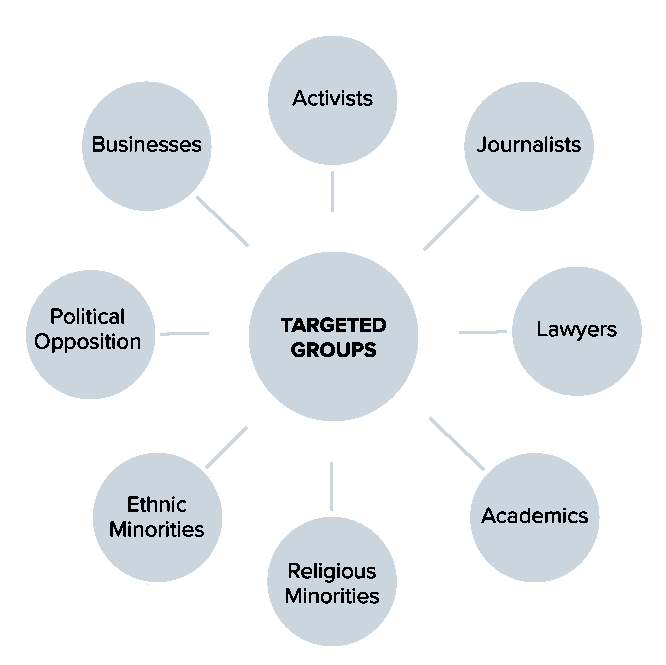
A study of Atlantic Council has identified the following categories, as “targeted groups” by sophisticated spyware.